
Welcome to cscope Enterprise AI.
This guide has been designed specifically with beginners in mind, providing step-by-step instructions on how to use Cscope's artificial intelligence. Even if you have no prior experience with AI systems, don't worry – we'll walk you through all the key features.
Getting started: How to sign up
Access to the System
You can access cscope Enterprise AI through your web browser using the URL you received via email. You don't need any special software—a modern browser like Chrome, Firefox, or Safari is all you need.
To log in, use your email address and the password provided by cscope. You cannot register on your own at this time—you will receive your login credentials directly from the cscope team.
What can you expect?
The user interface resembles the well-known ChatGPT and is designed to be very intuitive. The system is based on royalty-free open-source software. A major advantage: All AI-generated responses are not subject to copyright and can be used freely—even for commercial purposes.
Understanding the User Interface
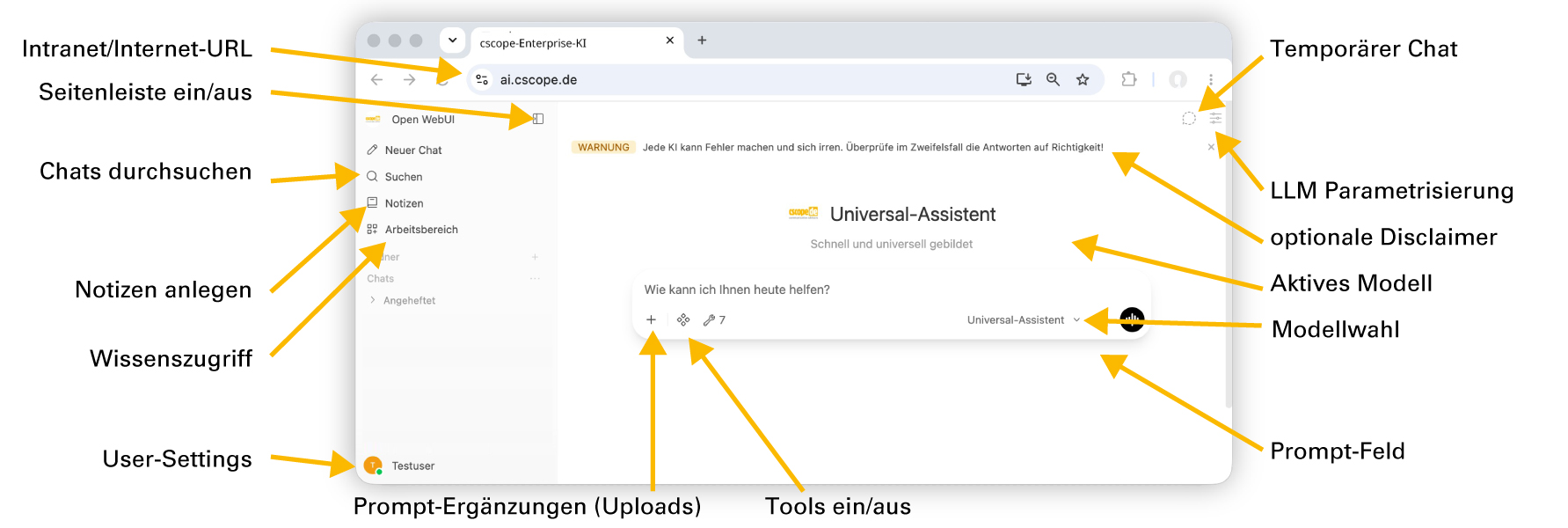
After logging in, you will see a clear and organised chat interface. In the centre of the main workspace, you can see your conversation with the AI, along with the input field for your questions and instructions. In the bottom right corner, you can choose from different AI models, each of which is optimised for specific tasks. The model you select significantly impacts the AI’s response time and the quality of its answers. Experiment to find out which model works best for your current task.
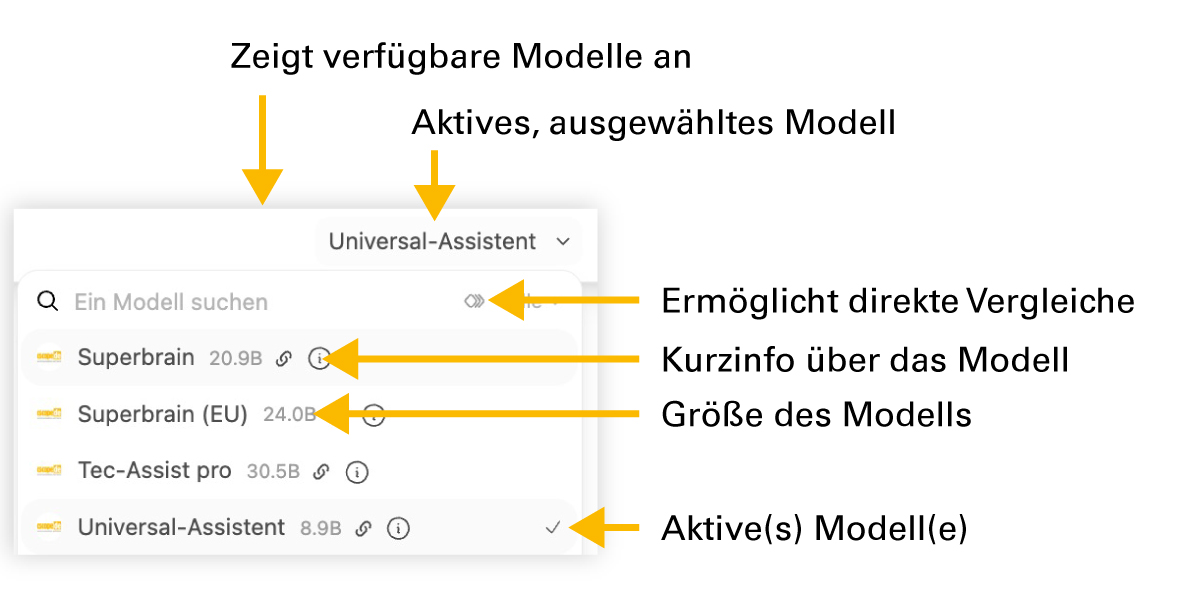
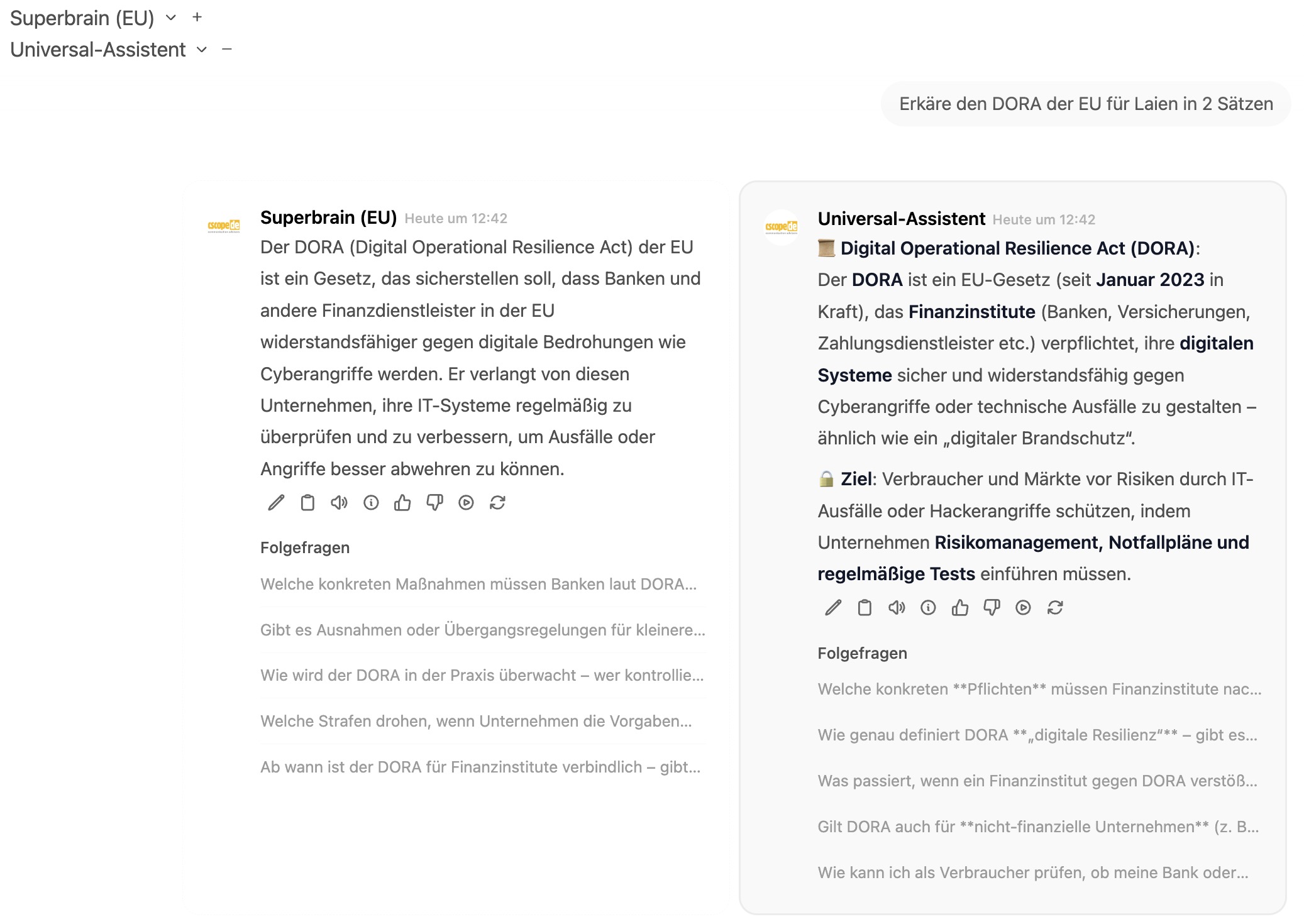
Unlike many other cloud-based AI solutions, you have the freedom to choose from the available AI models in your setup. You can also test multiple models simultaneously. To do this, select multiple models using the comparison icon to receive different responses simultaneously. You can disable the comparison feature by deselecting individual models.
Once you have submitted the prompt, the responses from the selected models will be displayed side by side. You can then click on one of the responses to select a model for follow-up questions, for example.
The 'Universal Assistant' model is a highly versatile model that is well-suited to most tasks. The other models offered, on the other hand, are specialised for specific tasks. Experiment to see which model works best for you.
An Overview of the Main Models
Universal-Assistent
The ideal model for high-quality, quick answers in everyday life. Perfect for:
- Information Research and Analysis
- Content Creation
- Document Analysis
- Calculations
Response time: Very fast (seconds)
Superbrain
The premium model for complex tasks. Ideal for:
- Detailed Text Analyses
- Solutions to Complex Problems
- High-quality voice transmission
- Structured Arguments
Response time: Slightly slower than "Universal Assistant"
Universal-Assistent:deep-reasoning
The ideal model for particularly well-thought-out and well-researched answers. Perfect for:
- Solving Difficult Problems
- Comparison of Options
- Problems to be Solved in Multiple Steps
Response time: Reasonable
deep-reasoning (slow)
Our experimental model for in-depth research and solving complex problems:
- Researches assignments using anonymized internet searches
- Verify any findings before formulating answers
- Particularly precise execution of prompts
Response time: The process of generating an answer may take several minutes. Occasionally, the message "Thinking..." will appear during this process. Click on the triangle to follow the AI's thought process.
Additional models may be available for your setup. If you would like to use a specialised, pre-trained model for a particular task, please do not hesitate to contact us.
Using the 'Superbrain' model correctly
If you need high-quality language and well-thought-out, well-structured answers, the Superbrain model is your best choice. Unlike the Universal Assistant, the Superbrain deliberately takes time to 'think' – sometimes for several minutes – and considers various possible solutions before presenting the best answer.
What Superbrain does especially well:
- Developing Complex Lines of Reasoning
- Write high-quality, stylistically polished texts
- Analyzing and Solving Logical Problems
- Create detailed analyses
- Addressing Multilayered Issues
Take advantage of the smart features of enterprise AI.
The cscope Enterprise AI provides fine-grained control over its functions. Customise the features to suit your specific needs.
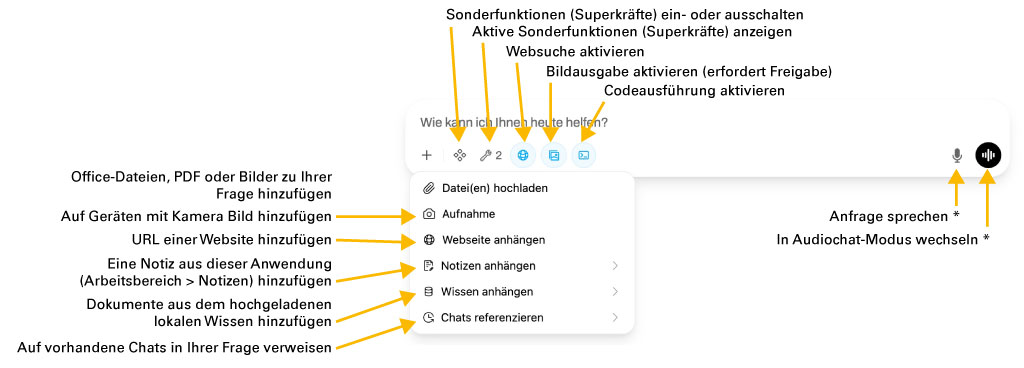
Click the + icon to access the menu where you can add any external information related to your request, such as documents.
These documents will never leave the Enterprise AI server.
Training Enterprise AI using additional local knowledge.
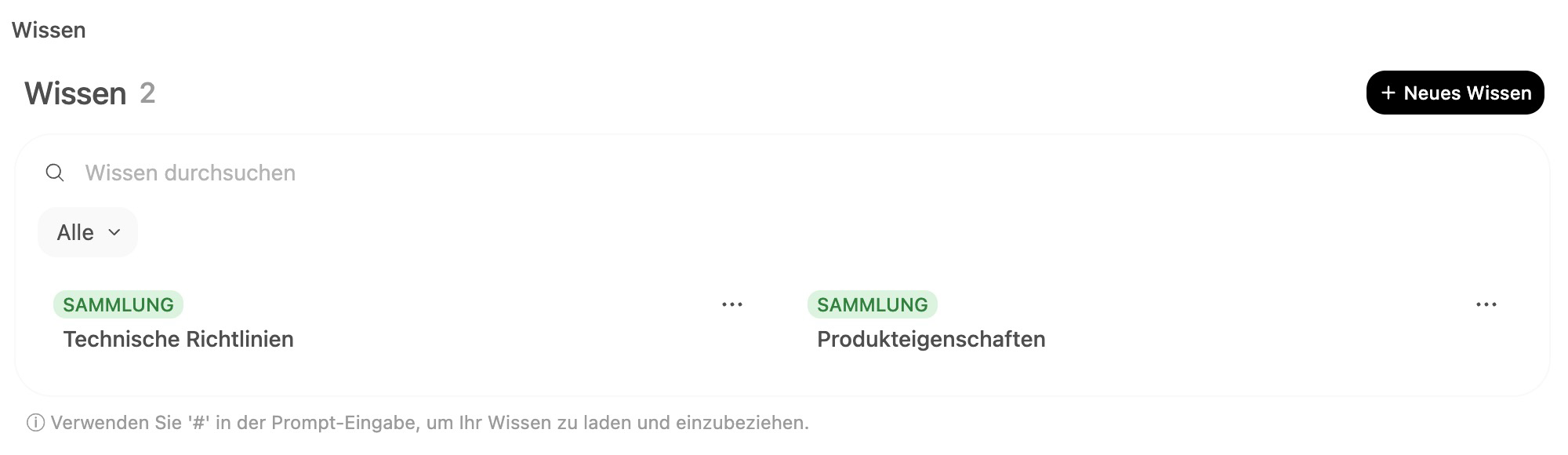
You can customise the cscope Enterprise AI to suit your specific needs by leveraging its built-in knowledge, its ability to search the internet and the additional information that is permanently stored. This knowledge is stored on the server and can be used to inform all future queries. The data never leaves the Enterprise AI server!
To add information about Enterprise AI, select 'Workspace' in the left-hand sidebar, then select 'Knowledge'. Click the 'Create' button to create one or more collections containing your documents. Each collection must be given a name. You can upload Office files and PDFs, as well as files in other formats in some cases.
You can restrict access to this local knowledge to specific individuals or groups using finely tuned access permissions. Of course, individual documents or even entire knowledge collections can be deleted at any time.
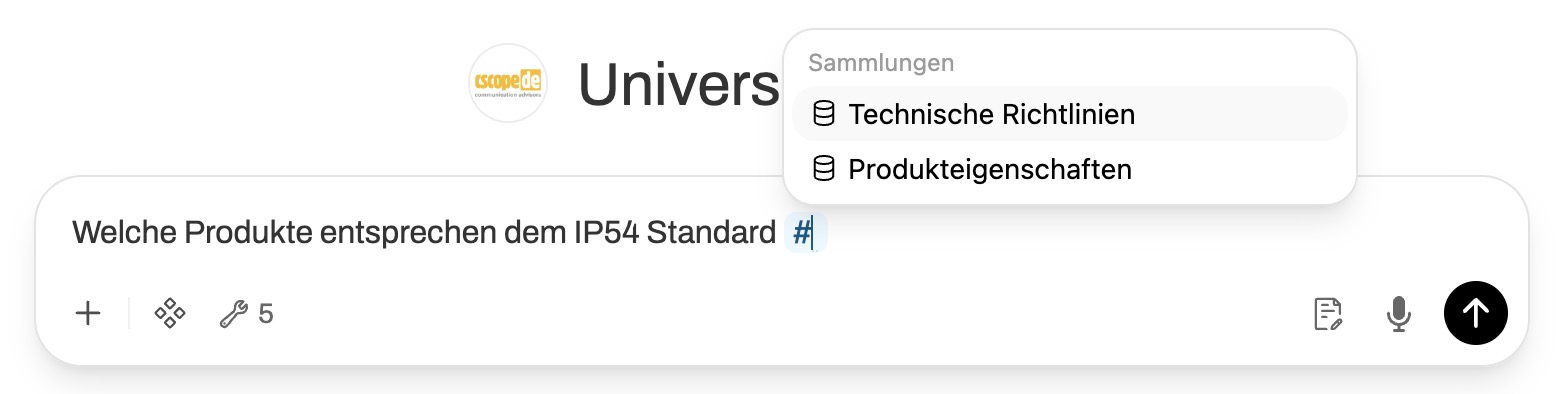
When asking a question, you can incorporate or 'retrieve' knowledge by typing # in the prompt window and then selecting from the available collections or individual documents. Alternatively, click '+' and then 'Attach Knowledge'.
rEnterprise AI features for optimizing Responses
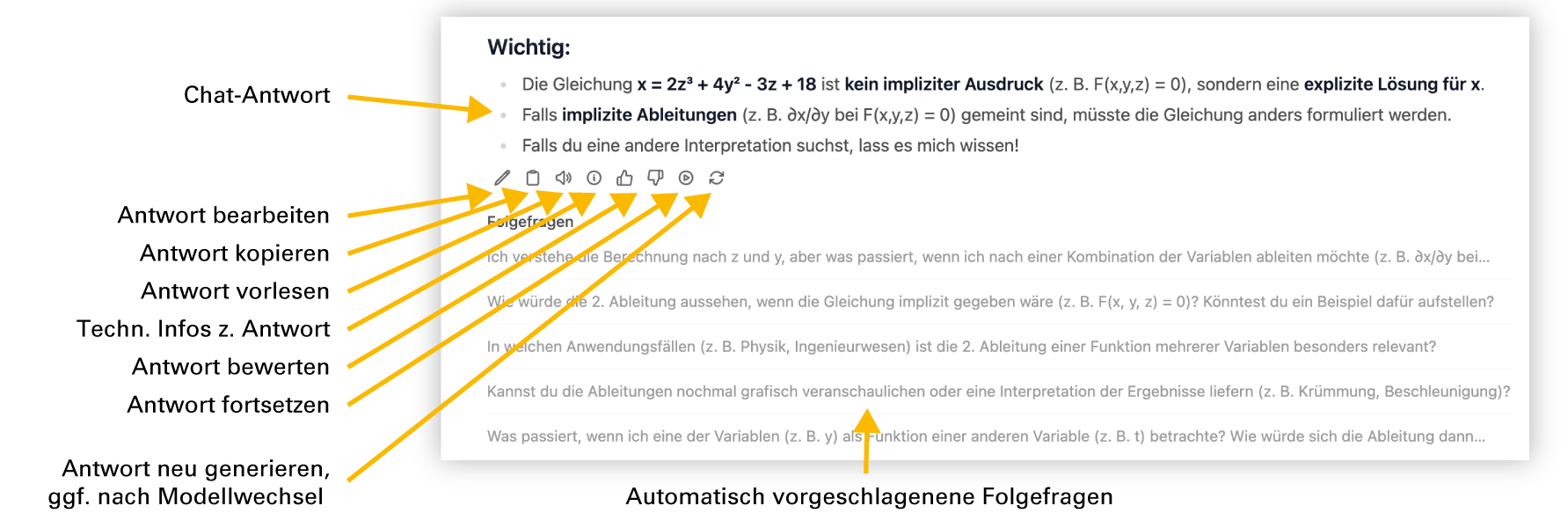
You can edit the Enterprise AI's responses before copying them, copy them, or rate them. You can also use the 'Regenerate Response' feature to request changes, ask the AI for a new response or shorter/longer versions of the response.
The suggested follow-up questions often offer interesting additional insights into your topic.
Communicating successfully with AI: The art of prompting
The quality of AI responses largely depends on how precisely and in detail you phrase your questions. A good 'prompt' – that's what the instruction to the AI is called – is the key to excellent results. Here are the most important basic rules:
One chat, one topic
Address only one issue per chat. Follow-up questions to explore a topic further or clarify details within the same subject are encouraged and lead to better results. The AI "remembers" the conversation so far.
New topic >> New chat
To switch to a completely new topic, click 'New Chat'. This is the only way to make the AI "forget" the previous context and focus entirely on the new task.
Create detailed prompts
The more detailed your instructions are, the better the answers you will receive. Describe exactly what you need and don't leave out any details!
The four pillars of a perfect prompt
1. Define the perspective
Specify the role from which the AI should respond:
- "Answer as a specialist attorney in contract law"
- "Write from the perspective of a marketing expert"
- "Express this from a scientific perspective"
2. Determine the level of detail
Please specify how detailed you would like the answer to be:
- "Write a text of about 500 words"
- "Sum it up in three bullet points"
- "Create a detailed table"
3. Specify the purpose of the use
Explain why you need the result:
- "Compose a formal email response"
- "Write a speech for a presentation"
- "Write an informative blog post"
4. Describe the target audience
Who is this answer intended for?
- "Explain it to a ten-year-old girl"
- "Phrase it in a way that experts in the field can understand"
- "Write for executives without a technical background"
"The more precise your instructions are, the better the AI can meet your expectations. Take the time to craft a well-thought-out prompt – it's worth it!"
Practical example:
Weniger guter Prompt
Write something about climate change
That's too vague; the AI doesn't know exactly what you need.
Ausgezeichneter Prompt
Write an informative essay about the effects of climate change on agriculture in Germany. Address the essay to farmers without a scientific background and write from the perspective of an environmental scientist. Use about 400 words. Explain complex concepts in an understandable way and provide practical examples.
It is clearly structured and contains all the important information about what is expected of the AI.
Here are some practical tips for getting the most out of it:
1
Start new chats more often
If your questions are not related, open a new chat for each one. This will prevent the AI from looking for non-existent connections between your questions.
2
Iteratively Improve Answers
If an answer isn't perfect, ask follow-up questions such as: "Can you elaborate on the second paragraph?" or "Please use more formal language." The AI learns from the feedback.
3
Using Documents Effectively
When uploading documents, provide specific instructions to the AI: For example, "Summarize the key points of the contract, paying special attention to notice periods," is better than simply saying, "Analyze this document."
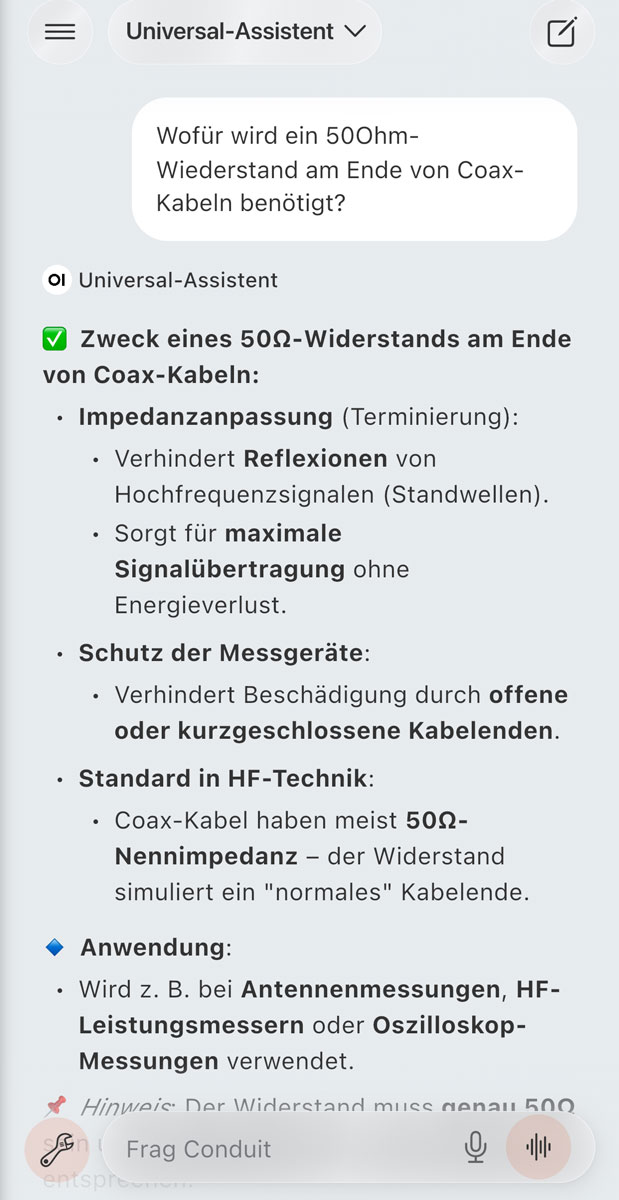
Mobile Use: Enterprise AI on iPhones and iPads:
We recommend the Conduit
app for use on Apple devices. This specialized app provides access to all of cscope AI's features in an optimized mobile interface.
Benefits of the Conduit app:
- Quick access on the go
- User interface optimized for touch control
- All desktop features available
- Seamless synchronization with the web version
Installation:
Download Conduit from the App Store and then sign in with your cscope AI credentials. That's it!
Summary: Your Next Steps
01
Sign up and explore!
Log in to the home page using the URL in the invitation email, and then familiarize yourself with the interface.
02
Select a model
Get started with the "Universal Assistent" for your first simple tasks.
03
Formulate the first prompt
Use the four pillars (perspective, level of detail, intended use, target audience) for your initial inquiry.
04
Experimenting
Try out different features and models to discover the system’s strengths. Additional models will be added based on your feedback.
05
The Superbrain Test
For more complex tasks, switch to the Superbrain model to experience higher quality.
Help and Support
We're here to help if you encounter technical issues, error messages, or unusual behavior from the AI. To help us troubleshoot, please take a screenshot of the issue and send it to us along with a brief description of the problem to: support@cscope.de
Our team will process your inquiries as quickly as possible and help you overcome any technical challenges.
This is just the beginning...
The use cases presented here offer an initial overview. The potential applications of this enterprise AI platform are virtually limitless. Numerous integrations with existing CRM or ERP solutions can be implemented via REST API connectivity. The open-source core software is well-documented and adaptable to almost any requirement or environment with a predictable amount of effort.
We wish you every success and hope you gain valuable insights as you work with Cscope Enterprise AI! With a little practice, you’ll quickly realize just how valuable this tool can be in your daily work.
Get started now!
Your AI. Secure. Integrated.
Under your control.
Bring powerful, on-premises AI directly into your IT infrastructure – no cloud, no third parties, GDPR-compliant and fully tailored to your processes.
Let’s explore together what your bespoke AI solution might look like – with no obligation and based on real-world scenarios.
Data sovereignty
Your sensitive data remains secure within your infrastructure.
Always available
Your AI solution operates reliably round the clock.
Independence
Full control without external cloud providers.